
自社ホームページに「話すアバター」を置きたい——そう思ったとき、まず調べるのはHeyGenやD-IDといったSaaSだろう。手軽だが、月額数千円〜数万円のコストが発生する。もし伝えたい内容が固定されているなら、動画を一度だけ生成してMP4ファイルとしてサーバに置くだけでよい。ランニングコストはゼロ。オープンソースで自前実装することで、技術の内側も理解できる。本記事はその実装記録だ。
1.SadTalkerとは何か
SadTalkerはCVPR 2023で発表されたオープンソースのトーキングヘッド生成モデルだ。「写真1枚+音声ファイル」を入力として、頭部の動きと口の動きが音声に合った動画を生成する。GitHubリポジトリは OpenTalker/SadTalker で公開されている。
処理フローを整理すると次のようになる。
- 写真+音声を入力
- 顔ランドマーク検出(98点 / AWing Architecture)
- 3DMM(3次元顔モデル)へのフィッティング
- 音声 → 表情係数(ExpNet)
- 音声 → 頭部動作(PoseVAE)
- 3D対応レンダラーでフレーム生成
- GFPGANで顔品質補正
- MP4出力
従来のリップシンク技術は「口の動きだけ」を合わせるものが多かったが、SadTalkerは頭部の動きも音声から生成する点が特徴だ。人間は話すとき、微妙に頭を傾けたり、うなずいたりする。そのリアリティを3DMMとVAEで実現している。
2.環境要件:ここが最大のハマりポイント
Windowsで動かすにあたり、最も重要な制約が2点ある。これを無視すると何時間もデバッグに費やすことになる。
| 項目 | 要件 | 備考 |
|---|---|---|
| OS | Windows 10 / 11 | Linux・Macでも動くが本記事はWindows |
| GPU | NVIDIA(VRAM 4GB以上) | RTX 2070 Superで確認 |
| Python | 3.11系(3.12〜3.14は不可) | PyTorchの対応状況による |
| NumPy | 1.26.4(2.x系は不可) | SadTalkerのコードが1.x系前提 |
| CUDA | 12.4(PyTorchインストール時に指定) | ドライバが新しければOK |
⚠️ **Python 3.14・NumPy 2.x系では動作しない。**この2点が最大のハマりポイントだ。最新版を使いたくなる気持ちはわかるが、SadTalkerのコードベースは古い仕様を前提に書かれており、新しいバージョンとの互換性がない。
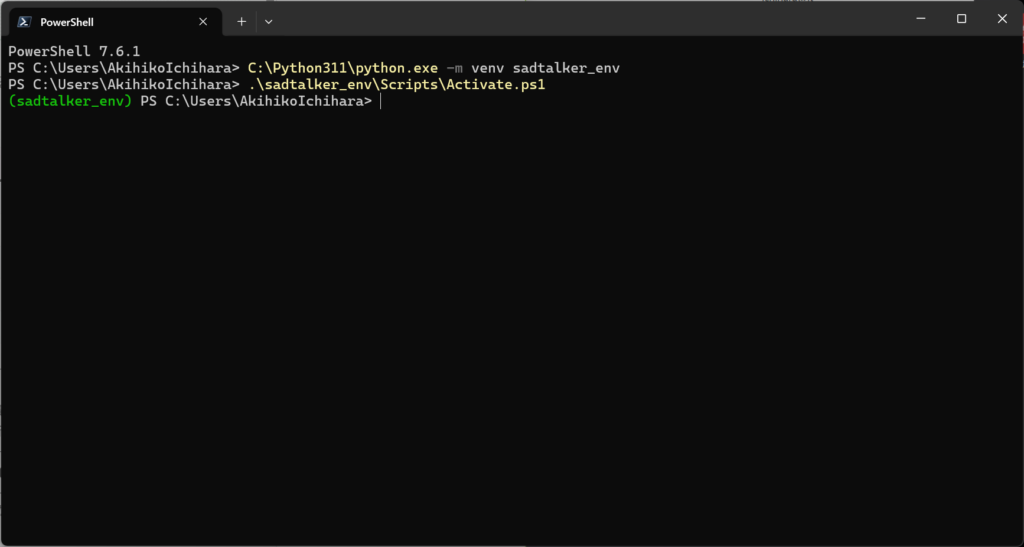
Power Shell 7で起動しないといけない。Windows Power Shellではないのでご注意。
3.インストール手順
3.1.Python 3.11のインストール
Python 3.11.9 ダウンロードページ からWindows installer (64-bit)をダウンロードする。インストール時に「Add python.exe to PATH」はチェックしない。カスタムパス(例:C:\Python311)に配置することで、既存のPython環境と混在させずに済む。
3.2.仮想環境の作成
C:\Python311\python.exe -m venv sadtalker_env .\sadtalker_env\Scripts\Activate.ps1 python —version # 3.11.x と表示されることを確認
C:\Python311\python.exe -m venv sadtalker_env
.\sadtalker_env\Scripts\Activate.ps1
python --version  # 3.11.x と表示されることを確認
3.3.PyTorch(CUDA 12.4版)のインストール
pip install torch torchvision torchaudio —index-url https://download.pytorch.org/whl/cu124
pip install torch torchvision torchaudio --index-url https://download.pytorch.org/whl/cu124インストール後、CUDAが使えているか確認する。
python -c “import torch; print(torch.__version__); print(torch.cuda.is_available()); print(torch.cuda.get_device_name(0))“
2.6.0+cu124 / True / NVIDIA GeForce RTX 2070 SUPER と表示されればOK
python -c "import torch; print(torch.__version__); print(torch.cuda.is_available()); print(torch.cuda.get_device_name(0))"
# 2.6.0+cu124 / True / NVIDIA GeForce RTX 2070 SUPER と表示されればOK
3.4.SadTalkerのセットアップ
git clone https://github.com/OpenTalker/SadTalker.git
cd SadTalker
pip install -r requirements.txt
git clone https://github.com/OpenTalker/SadTalker.git
cd SadTalker
pip install -r requirements.txtrequirements.txtには漏れがあるため、以下の追加パッケージも入れる。
pip install opencv-python tqdm pyyaml imageio imageio-ffmpeg scipy scikit-image kornia face-alignment facexlib safetensors yacs pydub librosa einops diffusers transformers gfpgan
pip install opencv-python tqdm pyyaml imageio imageio-ffmpeg scipy scikit-image kornia face-alignment facexlib safetensors yacs pydub librosa einops diffusers transformers gfpgan3.5.NumPyのバージョン固定(重要)
pip install “numpy==1.26.4” —force-reinstall
pip install "numpy==1.26.4" --force-reinstall他のパッケージのインストール順によってNumPyが最新版に上書きされることがある。必ずこのコマンドを最後に実行し、バージョンを固定すること。
4.事前学習モデルのダウンロード
Windowsでは自動ダウンロードスクリプト(.sh)が使えないため、モデルファイルは手動で配置する。
4.1.checkpoints(4ファイル)
SadTalker v0.0.2-rc リリースページから以下の4ファイルをダウンロードし、SadTalker\checkpoints\に配置する。
mapping_00109-model.pth.tar(149MB)mapping_00229-model.pth.tar(148MB)SadTalker_V0.0.2_256.safetensors(691MB)SadTalker_V0.0.2_512.safetensors(691MB)
4.2.gfpgan/weights(2ファイル)
PowerShellで直接ダウンロードできる。
mkdir gfpgan\weights
Invoke-WebRequest ` -Uri “https://github.com/xinntao/facexlib/releases/download/v0.1.0/alignment\_WFLW\_4HG.pth” ` -OutFile “gfpgan\weights\alignment_WFLW_4HG.pth”
Invoke-WebRequest ` -Uri “https://github.com/xinntao/facexlib/releases/download/v0.2.2/detection\_Resnet50\_Final.pth” ` -OutFile “gfpgan\weights\detection_Resnet50_Final.pth”
mkdir gfpgan\weights

Invoke-WebRequest `
  -Uri "https://github.com/xinntao/facexlib/releases/download/v0.1.0/alignment_WFLW_4HG.pth" `
  -OutFile "gfpgan\weights\alignment_WFLW_4HG.pth"

Invoke-WebRequest `
  -Uri "https://github.com/xinntao/facexlib/releases/download/v0.2.2/detection_Resnet50_Final.pth" `
  -OutFile "gfpgan\weights\detection_Resnet50_Final.pth"
5.パッチの当て方:3箇所の修正が必要
SadTalkerをWindowsで動かすには、ライブラリのバージョン差異に起因する3箇所のパッチが必要だ。これが最もノウハウが必要な部分であり、本記事の核心でもある。
5.1.パッチ①:basicsr/torchvision API変更対応
**原因:**新しいtorchvisionでfunctional_tensorモジュールが廃止された。basicsrが古いインポートパスを参照しているため、起動時にImportErrorが発生する。
(Get-Content “C:\Users\{username}\sadtalker_env\Lib\site-packages\basicsr\data\degradations.py”) ` -replace “from torchvision.transforms.functional_tensor import rgb_to_grayscale”, ` “from torchvision.transforms.functional import rgb_to_grayscale” ` | Set-Content “C:\Users\{username}\sadtalker_env\Lib\site-packages\basicsr\data\degradations.py”
(Get-Content "C:\Users\{username}\sadtalker_env\Lib\site-packages\basicsr\data\degradations.py") `
  -replace "from torchvision.transforms.functional_tensor import rgb_to_grayscale", `
           "from torchvision.transforms.functional import rgb_to_grayscale" `
| Set-Content "C:\Users\{username}\sadtalker_env\Lib\site-packages\basicsr\data\degradations.py"{username}は自分のWindowsユーザー名に置き換える。
5.2.パッチ②:np.float廃止対応(SadTalkerソース一括置換)
**原因:**NumPy 1.20以降でnp.floatが廃止されたが、SadTalkerのソースに旧記法が残っている。複数ファイルに散在しているため、一括置換する。
Get-ChildItem -Path ”.\src” -Recurse -Filter “*.py” | ForEach-Object { $content = Get-Content $_.FullName -Raw if ($content -match “np\.float[^0-9_]”) { $content = $content -replace “np\.float([^0-9_])”, “float`$1” Set-Content $_.FullName $content Write-Host “Patched: $($_.FullName)” } }
Get-ChildItem -Path ".\src" -Recurse -Filter "*.py" | ForEach-Object {
    $content = Get-Content $_.FullName -Raw
    if ($content -match "np\.float[^0-9_]") {
        $content = $content -replace "np\.float([^0-9_])", "float`$1"
        Set-Content $_.FullName $content
        Write-Host "Patched: $($_.FullName)"
    }
}
5.3.パッチ③:trans_params型不一致
原因:t[0]とt[1]が配列として返されるため、np.array()の生成に失敗する。明示的にfloat()でスカラー変換することで解決する。
(Get-Content ”.\src\face3d\util\preprocess.py” -Raw) ` -replace “trans_params = np\.array\(\[w0, h0, s, t\[0\], t\[1\]\]\)”, ` “trans_params = np.array([w0, h0, s, float(t[0]), float(t[1])])” ` | Set-Content ”.\src\face3d\util\preprocess.py”
(Get-Content ".\src\face3d\util\preprocess.py" -Raw) `
  -replace "trans_params = np\.array\(\[w0, h0, s, t\[0\], t\[1\]\]\)", `
           "trans_params = np.array([w0, h0, s, float(t[0]), float(t[1])])" `
  | Set-Content ".\src\face3d\util\preprocess.py"
6.実行
6.1.音声の準備
音読さんなどのTTSサービスでWAVファイルを生成する。SadTalkerへの入力は16kHzまたは22kHz・モノラルが安定する。フォーマットが異なる場合はffmpegで変換する。
ffmpeg -i input.mp3 -ar 16000 -ac 1 input.wav
ffmpeg -i input.mp3 -ar 16000 -ac 1 input.wav6.2.動画生成
python inference.py ` —driven_audio “音声ファイル.wav” ` —source_image “写真ファイル.jpg” ` —result_dir ./results ` —preprocess crop ` —enhancer gfpgan
python inference.py `
  --driven_audio "音声ファイル.wav" `
  --source_image "写真ファイル.jpg" `
  --result_dir ./results `
  --preprocess crop `
--enhancer gfpgan写真のポイント:正面向き・均一背景・顔の周囲に余白あり。この3点が顔検出の精度に直結するため、守ること。
6.3.Web埋め込み用に再エンコード
SadTalkerの出力はデフォルトのメディアプレーヤーで再生できないことがある。H.264に変換しておく。
ffmpeg -i “results\output.mp4” -vcodec libx264 -acodec aac -pix_fmt yuv420p “output_web.mp4”
ffmpeg -i "results\output.mp4" -vcodec libx264 -acodec aac -pix_fmt yuv420p "output_web.mp4"7.Webへの埋め込み
<video autoplay muted loop playsinline width="400">
  <source src="/assets/avatar.mp4" type="video/mp4">
</video>注意:autoplayはmutedとセットでないとブラウザにブロックされる。これはブラウザの自動再生ポリシーの仕様であり、回避策はない。ミュートで自動再生→ユーザー操作後に音声ON、という設計が現実的だ。
※要注意
ここまでで完了、のはずだった。がしかし、iPhoneとiPadで表示されない。結果して、YouTubeにアップロードしてWebに貼り付けることで回避した。その経緯は、ITQ Insightに公開しました。
[
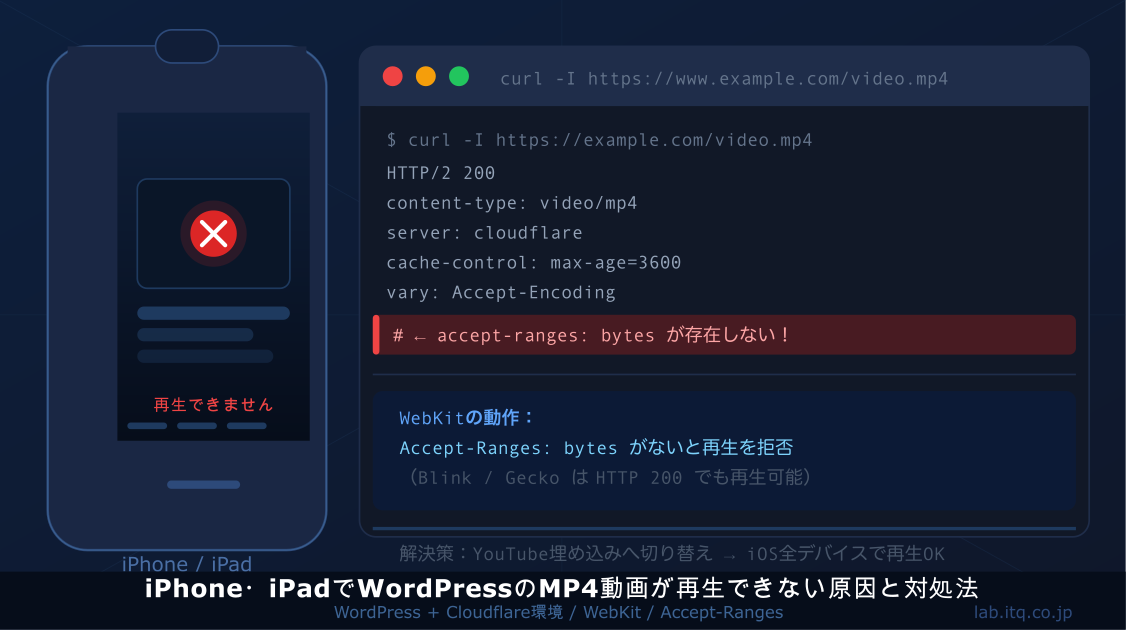
iPhone・iPadでWordPressのMP4動画が再生できない原因と対処法
WordPressにアップロードしたMP4動画が、PCやAndroidでは問題なく再生できるのに、iPhoneやiPad…
blog.itq.co.jp
](https://blog.itq.co.jp/reasons-why-mp4-videos-wont-play-on-wordpress-via-iphone-and-ipad-and-how-to-fix-it “iPhone・iPadでWordPressのMP4動画が再生できない原因と対処法”)
8.技術の深掘り:SadTalkerの仕組み
8.1.3DMMとは何か
3DMM(3D Morphable Model)は、人間の顔を「形状パラメータ」と「テクスチャパラメータ」の集合で表現する手法だ。顔は無数に存在するように見えるが、その多様性は少数の基底ベクトルの線形結合で近似できるという発想に基づく。SadTalkerはこの顔モデルに対して音声から計算した表情係数を適用し、フレームごとの顔形状を決定する。ピクセルを直接操作するのではなく、3D空間上のパラメータを操作することで、照明変化や角度変化に対してロバストな出力が得られる。
8.2.ExpNet:音声から表情係数を生成する
ExpNetは音声波形をメルスペクトログラムに変換し、そこから表情係数を予測するネットワークだ。従来のリップシンクがピクセルレベルで口の形を操作するのに対し、ExpNetは3DMM空間上の係数を操作する。これにより、単純な口パクでなく、眉・頬・あごの動きも含めた自然な表情変化が得られる。
8.3.PoseVAE:頭部動作の生成
PoseVAEは発話に合わせた頭部動作(うなずき・傾き)を生成するVariational Autoencoderだ。人間の発話中の頭部動作は音声と統計的な相関を持つ。この相関をVAEで学習することで、ただ口が動くだけでなく、話している人間らしい「生き生きとした動き」を動画に与えている。これが従来のリップシンクとの最大の差異だ。
8.4.GFPGANによる顔品質補正
GFPGAN(Generative Facial Prior GAN)は顔に特化した超解像・品質補正モデルだ。SadTalkerの生成フレームは3Dレンダリングを経るため、細部がぼやけることがある。GFPGANはこれを補正し、シャープで自然な顔の出力を得るために使われている。
9.まとめと今後の展開
SadTalkerをWindowsで動かすにあたり、重要なポイントは次の3点だ。
- **Python 3.11・NumPy 1.26.4を使う:**これを守らないと動かない。最新版を使おうとしないこと。
- **3箇所のパッチを当てる:**basicsr・np.float・trans_paramsの修正は必須。エラーメッセージを見れば原因は特定できるが、対処法はこの記事に集約した。
- **写真と音声の品質が出力を左右する:**正面顔・均一背景・クリアな音声。入力品質への投資が最もコストパフォーマンスが高い。
ランニングコストゼロで、技術的な制約なく動画生成ができる環境が整った。次のステップとして、Style-Bert-VITS2によるより自然な日本語音声生成との組み合わせを検討している。合成音声の品質が上がれば、アバターの完成度も大きく向上するはずだ。続編記事として比較検証を予定している。
10.使用ソフトウェア一覧
| ソフトウェア | バージョン | 役割 |
|---|---|---|
| Python | 3.11.9 | 実行環境 |
| PyTorch | 2.6.0+cu124 | ディープラーニング基盤 |
| NumPy | 1.26.4 | 数値計算(バージョン固定必須) |
| SadTalker | v0.0.2-rc | talking head生成エンジン |
| FFmpeg | 8.1.1 | 動画処理・再エンコード |
| GFPGAN | – | 顔品質補正 |
| basicsr | – | 画像復元基盤(パッチ必要) |
| opencv-python | 4.13 | 画像処理 |
| face-alignment / facexlib | – | 顔検出・ランドマーク |
11.今回使用した素材とアウトプット

12.おまけ(アバターと音声作成HTML:要Gemni API Key)
以下のHTMLコードをダウンロードしてローカルに適当な名前を付けて保存してブラウザで開いていただくとサンプル用の画像と音声ファイルを生成できます。
ご利用にはGemini API Keyが必要になります。Gemini API Keyの取得は、「APIキーを無料で取得する」のリンクで「Google AI Studio」を開いてログインした後、左下の「Get API Key」から取得してください。
💡 本ツールの利用に関するご注意・免責事項
本ツールは、読者の皆様への情報提供および利便性の向上を目的とした「おまけコンテンツ」として無償で提供しているものです。ご利用にあたっては、以下の事項についてあらかじめご了承いただきますようお願い申し上げます。
- 自己責任でのご利用 > 本ツールの利用、および本ツールによって生成されたアバター画像やナレーション原稿(以下、成果物)の利用は、すべて利用者の皆様ご自身の責任において行っていただきます。
- APIキーの取り扱い > 入力された「Gemini APIキー」は、ご利用のブラウザ内(ローカル環境)でのみ処理され、当社のサーバー等に送信または保存されることはありません。ただし、APIキーの管理不足による第三者への漏洩や、それに伴う課金等のトラブルについて、当社は一切の責任を負いかねます。
- 成果物のライセンスと権利関係 > 生成された成果物の著作権および商用利用の可否は、提供元であるGoogle社(Gemini / Imagen)の最新の利用規約に従います。成果物の利用によって生じた第三者との知的財産権等のトラブルや紛争について、当社は関与せず、一切の責任を負いません。
- 動作保証の否認 > 当社は、本ツールが常時正常に動作すること、不具合が生じないこと、および特定のTalking Head AI(SadTalker等)でエラーなく読み込めることを保証するものではありません。
- 免責事項 > 万一、本ツールの利用または利用不能により、ご利用者に直接的・間接的な損害(データの損失、業務の停止、金銭的損失、AIサービスの利用規約違反によるアカウント停止などを含むがこれらに限らない)が発生した場合であっても、当社は一切の賠償責任を負わないものとします。
<!-- Header -->
<header class="bg-white border-b border-slate-200 sticky top-0 z-50">
<div class="max-w-7xl mx-auto px-4 sm:px-6 lg:px-8 h-16 flex items-center justify-between">
<div class="flex items-center space-x-3">
<div class="w-10 h-10 rounded-lg bg-blue-600 flex items-center justify-center text-white font-bold text-xl">
IQ
</div>
<div>
<h1 class="text-lg font-bold text-slate-900 leading-tight">ITクオリティ株式会社</h1>
<p class="text-xs text-slate-500">紹介動画用アバター&台本生成ツール</p>
</div>
</div>
<div class="flex items-center space-x-2 text-xs text-slate-500 bg-slate-100 px-3 py-1.5 rounded-full">
<span class="w-2 h-2 rounded-full bg-green-500 animate-pulse"></span>
<span>SadTalker 適合最適化モード</span>
</div>
</div>
</header>
<!-- Main Content -->
<main class="flex-1 max-w-7xl mx-auto w-full px-4 sm:px-6 lg:px-8 py-8 flex flex-col lg:flex-row gap-8">
<!-- Left Column: Controls -->
<div class="w-full lg:w-5/12 space-y-6">
<!-- API Key Input Card (Added for Secure Public Sharing) -->
<div class="bg-gradient-to-br from-blue-900 to-indigo-955 text-white rounded-2xl p-6 shadow-md shadow-blue-900/10 border border-blue-800">
<div class="flex items-center space-x-2 mb-3">
<i data-lucide="key" class="text-blue-300 w-5 h-5"></i>
<h2 class="text-base font-bold text-blue-100">APIキーの設定</h2>
</div>
<p class="text-xs text-blue-200/80 mb-4 leading-relaxed">
このツールを動かすにはGoogle AI Studioで取得したご自身のGemini APIキーが必要です。キーはブラウザ上でのみ安全に処理されます。
</p>
<div class="space-y-3">
<div class="relative">
<input type="password" id="api-key-input" class="w-full bg-blue-950/50 border border-blue-700/80 rounded-lg px-3 py-2.5 text-sm text-white placeholder-blue-400 focus:outline-none focus:ring-2 focus:ring-blue-500 focus:border-transparent transition-all pr-10" placeholder="AIzaSy...(Gemini APIキーを入力)">
<button onclick="toggleApiKeyVisibility()" class="absolute right-3 top-3 text-blue-400 hover:text-blue-200">
<i data-lucide="eye" id="toggle-key-icon" class="w-4 h-4"></i>
</button>
</div>
<div class="flex justify-between items-center text-\[11px\]">
<a href="https://aistudio.google.com/" target="\_blank" rel="noopener noreferrer" class="text-blue-300 hover:text-blue-100 underline flex items-center space-x-1">
<span>APIキーを無料で取得する</span>
<i data-lucide="external-link" class="w-3 h-3"></i>
</a>
<span class="text-blue-400">※サーバーには送信されません</span>
</div>
</div>
</div>
<!-- Avatar Settings Card -->
<div class="bg-white rounded-2xl p-6 shadow-sm border border-slate-100">
<div class="flex items-center space-x-2 mb-4">
<i data-lucide="sliders" class="text-blue-600 w-5 h-5"></i>
<h2 class="text-lg font-bold text-slate-900">アバター構造設定</h2>
</div>
<!-- Gender Select -->
<div class="mb-5">
<label class="block text-xs font-semibold text-slate-500 uppercase tracking-wider mb-2">性別</label>
<div class="grid grid-cols-2 gap-3">
<button onclick="setGender('male')" id="btn-male" class="flex items-center justify-center space-x-2 p-3 rounded-xl border-2 border-blue-600 bg-blue-50/50 text-blue-700 font-medium transition-all">
<i data-lucide="user" class="w-4 h-4"></i>
<span>男性アバター</span>
</button>
<button onclick="setGender('female')" id="btn-female" class="flex items-center justify-center space-x-2 p-3 rounded-xl border border-slate-200 text-slate-600 hover:bg-slate-50 font-medium transition-all">
<i data-lucide="user" class="w-4 h-4"></i>
<span>女性アバター</span>
</button>
</div>
</div>
<!-- Detail Settings -->
<div class="space-y-4">
<div>
<label class="block text-xs font-semibold text-slate-500 uppercase tracking-wider mb-2">年齢イメージ</label>
<select id="setting-age" class="w-full rounded-lg border border-slate-200 bg-slate-50 px-3 py-2 text-sm focus:outline-none focus:ring-2 focus:ring-blue-500">
<option value="20代後半">20代後半 (フレッシュ・活動的)</option>
<option value="30代前半" selected>30代前半 (知的・信頼感)</option>
<option value="40代前半">40代前半 (経験豊富・落ち着き)</option>
</select>
</div>
<div>
<label class="block text-xs font-semibold text-slate-500 uppercase tracking-wider mb-2">特徴</label>
<div class="grid grid-cols-2 gap-2">
<label class="flex items-center space-x-2 p-2 rounded border border-slate-100 cursor-pointer hover:bg-slate-50">
<input type="checkbox" id="setting-glasses" checked class="rounded text-blue-600 focus:ring-blue-500">
<span class="text-xs text-slate-700">知的な眼鏡をかける</span>
</label>
<label class="flex items-center space-x-2 p-2 rounded border border-slate-100 cursor-pointer hover:bg-slate-50">
<input type="checkbox" id="setting-smile" checked class="rounded text-blue-600 focus:ring-blue-500">
<span class="text-xs text-slate-700">穏やかな微笑み</span>
</label>
</div>
</div>
<div>
<label class="block text-xs font-semibold text-slate-500 uppercase tracking-wider mb-2">服装</label>
<select id="setting-clothing" class="w-full rounded-lg border border-slate-200 bg-slate-50 px-3 py-2 text-sm focus:outline-none focus:ring-2 focus:ring-blue-500">
<option value="dark navy bespoke business suit with light blue dress shirt">ダークネイビーのスーツ + ブルーシャツ</option>
<option value="charcoal gray smart blazer jacket with white clean shirt">チャコールグレーのジャケット + 白シャツ</option>
<option value="navy blazer with smart white shirt, business casual style, no tie">オフィスカジュアル (ノーネクタイ)</option>
</select>
</div>
<div>
<label class="block text-xs font-semibold text-slate-500 uppercase tracking-wider mb-2">背景(SadTalkerの精度に直結)</label>
<select id="setting-bg" class="w-full rounded-lg border border-slate-200 bg-slate-50 px-3 py-2 text-sm focus:outline-none focus:ring-2 focus:ring-blue-500">
<option value="solid light-gray studio backdrop. Completely uniform, homogeneous, clean and simple solid background with no patterns or shadows." selected>シンプル・ライトグレー(均一背景・推奨)</option>
<option value="solid light-blue studio backdrop. Completely uniform, homogeneous, clean and simple solid background with no patterns or shadows.">シンプル・淡いブルー(均一背景・推奨)</option>
<option value="very softly blurred modern IT office background with extremely low contrast, clean and simple corporate environment.">オフィス環境(ソフトぼかし・低コントラスト)</option>
</select>
</div>
</div>
<!-- Generate Buttons -->
<div class="mt-6 pt-4 border-t border-slate-100">
<button onclick="generateAvatar()" id="btn-generate-avatar" class="w-full py-3 px-4 rounded-xl bg-gradient-to-r from-blue-600 to-indigo-600 text-white font-semibold flex items-center justify-center space-x-2 hover:from-blue-700 hover:to-indigo-700 active:scale-\[0.98\] transition-all shadow-md shadow-blue-200">
<i data-lucide="sparkles" class="w-5 h-5"></i>
<span>SadTalker最適化アバターを生成</span>
</button>
<p class="text-\[10px\] text-slate-400 mt-2 text-center">
※AI画像モデルが動作し、指定された3つの適合基準に沿った画像を自動構築します。
</p>
</div>
</div>
<!-- Script Settings Card -->
<div class="bg-white rounded-2xl p-6 shadow-sm border border-slate-100">
<div class="flex items-center space-x-2 mb-4">
<i data-lucide="file-text" class="text-indigo-600 w-5 h-5"></i>
<h2 class="text-lg font-bold text-slate-900">30秒ナレーション台本作成</h2>
</div>
<div class="space-y-4">
<div>
<label class="block text-xs font-semibold text-slate-500 uppercase tracking-wider mb-2">会社の特徴・訴求したい強み</label>
<textarea id="script-features" rows="3" class="w-full rounded-lg border border-slate-200 bg-slate-50 px-3 py-2 text-sm focus:outline-none focus:ring-2 focus:ring-indigo-500 placeholder-slate-400" placeholder="例: DX推進、ITコンサルティング、高品質なシステム開発、迅速なサポート、経営に寄り添うパートナー など"></textarea>
</div>
<div>
<label class="block text-xs font-semibold text-slate-500 uppercase tracking-wider mb-2">語り口調トーン</label>
<select id="script-tone" class="w-full rounded-lg border border-slate-200 bg-slate-50 px-3 py-2 text-sm focus:outline-none focus:ring-2 focus:ring-indigo-500">
<option value="誠実で信頼感のある敬体(です・ます調)">誠実でプロフェッショナルなトーン</option>
<option value="先進的で情熱的なイノベーター風トーン">先進的で熱意のあるトーン</option>
<option value="優しく親しみやすいビジネスパートナー風トーン">親しみやすく優しいトーン</option>
</select>
</div>
<button onclick="generateScript()" id="btn-generate-script" class="w-full py-2.5 px-4 rounded-xl border border-indigo-200 bg-indigo-50 text-indigo-700 font-semibold flex items-center justify-center space-x-2 hover:bg-indigo-100 active:scale-\[0.98\] transition-all">
<i data-lucide="brain" class="w-4 h-4"></i>
<span>30秒ナレーションをAI自動作成</span>
</button>
</div>
</div>
</div>
<!-- Right Column: Results -->
<div class="w-full lg:w-7/12 space-y-6">
<!-- Preview Canvas Card -->
<div class="bg-white rounded-2xl shadow-sm border border-slate-100 overflow-hidden flex flex-col">
<div class="bg-slate-900 px-6 py-4 flex items-center justify-between text-white">
<div class="flex items-center space-x-2">
<i data-lucide="video" class="text-blue-400 w-5 h-5"></i>
<span class="font-bold">SadTalker用 肖像画プレビュー</span>
</div>
<div class="text-xs text-slate-400">正面向き・均一背景・十分な余白</div>
</div>
<div class="p-6 flex flex-col items-center justify-center bg-slate-100 border-b border-slate-200 min-h-\[400px\] relative">
<!-- Placeholder Container -->
<div id="avatar-placeholder" class="text-center p-8 max-w-sm">
<div class="w-20 h-20 rounded-full bg-blue-100 flex items-center justify-center mx-auto mb-4 text-blue-600">
<i data-lucide="image" class="w-10 h-10 animate-bounce"></i>
</div>
<h3 class="text-slate-700 font-bold mb-1">アバターが未生成です</h3>
<p class="text-xs text-slate-500">左上の設定でAPIキーを入力後、設定ボタンを押すと、検出精度を高める「3大ルール(正面、無地背景、適切な頭上余白)」を満たしたポートレートが生成されます。</p>
</div>
<!-- Loader Container -->
<div id="avatar-loader" class="hidden text-center">
<div class="relative w-24 h-24 mx-auto mb-4">
<div class="absolute inset-0 rounded-full border-4 border-blue-100"></div>
<div class="absolute inset-0 rounded-full border-4 border-t-blue-600 animate-spin"></div>
</div>
<h3 class="text-slate-800 font-bold text-base">高精度アバターをレンダリング中...</h3>
<p class="text-xs text-slate-500 mt-1">口元の歪みを防ぐ調整レイヤーを設定しています。</p>
</div>
<!-- Image Display -->
<div id="avatar-container" class="hidden w-full max-w-md mx-auto aspect-square rounded-xl overflow-hidden shadow-lg bg-white border border-slate-200 relative group">
<img id="generated-avatar" src="" alt="Generated Avatar" class="w-full h-full object-cover">
<div class="absolute inset-0 bg-black/40 opacity-0 group-hover:opacity-100 transition-opacity flex items-center justify-center space-x-3">
<button onclick="downloadImage()" class="p-3 bg-white rounded-full text-slate-800 hover:bg-slate-100 hover:scale-105 transition-all shadow shadow-black/20" title="画像をダウンロード">
<i data-lucide="download" class="w-6 h-6"></i>
</button>
</div>
</div>
<!-- SadTalker Optimization Checklist -->
<div id="tip-sadtalker" class="hidden mt-4 bg-emerald-50 border border-emerald-200 rounded-xl p-4 w-full max-w-md">
<div class="flex items-start space-x-3">
<i data-lucide="check-circle-2" class="text-emerald-600 w-5 h-5 mt-0.5 flex-shrink-0"></i>
<div class="text-xs text-emerald-800 space-y-1.5 w-full">
<span class="font-bold text-sm block text-emerald-900">✅ SadTalker 適合性テストクリア!</span>
<ul class="space-y-1 text-emerald-700">
<li class="flex items-center space-x-1.5">
<i data-lucide="check" class="w-3.5 h-3.5 text-emerald-600"></i>
<span><strong>完全正面向き:</strong> 首の角度の歪みを排除しました。</span>
</li>
<li class="flex items-center space-x-1.5">
<i data-lucide="check" class="w-3.5 h-3.5 text-emerald-600"></i>
<span><strong>均一な単色背景:</strong> 輪郭カット時のノイズやちらつきを防ぎます。</span>
</li>
<li class="flex items-center space-x-1.5">
<i data-lucide="check" class="w-3.5 h-3.5 text-emerald-600"></i>
<span><strong>顔の周囲に広い余白:</strong> 頭上が見切れずスムーズにアニメーションが可能です。</span>
</li>
</ul>
</div>
</div>
</div>
</div>
<!-- Action Bar -->
<div class="px-6 py-4 bg-slate-50 flex items-center justify-between">
<span class="text-xs text-slate-500" id="status-text">ステータス: 待機中</span>
<button id="btn-download" disabled onclick="downloadImage()" class="px-4 py-2 bg-slate-200 text-slate-400 font-semibold rounded-lg flex items-center space-x-1.5 text-sm cursor-not-allowed transition-all">
<i data-lucide="download" class="w-4 h-4"></i>
<span>画像を保存 (PNG)</span>
</button>
</div>
</div>
<!-- Script Result Card -->
<div class="bg-white rounded-2xl shadow-sm border border-slate-100 p-6 space-y-4">
<div class="flex items-center justify-between">
<div class="flex items-center space-x-2">
<i data-lucide="feather" class="text-indigo-600 w-5 h-5"></i>
<h2 class="text-lg font-bold text-slate-900">30秒ナレーション台本 (読上げ約150文字)</h2>
</div>
<button onclick="copyScriptText()" id="btn-copy" class="text-xs text-slate-500 hover:text-indigo-600 flex items-center space-x-1 border border-slate-200 rounded px-2.5 py-1 hover:bg-slate-50 transition-all">
<i data-lucide="copy" class="w-3.5 h-3.5"></i>
<span id="copy-btn-text">コピー</span>
</button>
</div>
<div class="relative bg-slate-50 rounded-xl p-4 border border-slate-100 min-h-\[120px\]">
<!-- Script Loader -->
<div id="script-loader" class="hidden absolute inset-0 bg-white/80 flex items-center justify-center">
<div class="flex items-center space-x-2 text-indigo-600 text-sm font-semibold">
<span class="w-2 h-2 rounded-full bg-indigo-600 animate-bounce"></span>
<span class="w-2 h-2 rounded-full bg-indigo-600 animate-bounce \[animation-delay:0.2s\]"></span>
<span class="w-2 h-2 rounded-full bg-indigo-600 animate-bounce \[animation-delay:0.4s\]"></span>
<span>台本を執筆中...</span>
</div>
</div>
<textarea id="output-script" rows="5" placeholder="こちらにAIが生成したナレーションが表示されます。自由に修正も可能です。"></textarea>
<div class="absolute bottom-3 right-3 text-\[10px\] text-slate-400" id="char-counter">
文字数: 0文字 (約 0秒)
</div>
</div>
<div class="text-xs text-slate-500 bg-slate-50 rounded-xl p-4 border border-slate-100 space-y-1">
<div class="font-bold text-slate-700">💡 SadTalkerでの音声作成のコツ:</div>
<p>1. このテキストを「音読」して30秒前後に収まることを確認します(1秒間に約5〜6文字が標準です)。</p>
<p>2. 音声合成ツール(ElevenLabs、CoeFont、VOICEVOXなど)で音声ファイル(WAV/MP3)を作成します。</p>
<p>3. SadTalkerに「本ツールで生成したアバター画像」と「作成した音声」をセットして動画を作成します。</p>
</div>
</div>
</div>
</main>
<!-- Error Modal -->
<div id="error-modal" class="hidden fixed inset-0 z-50 bg-black/50 flex items-center justify-center p-4">
<div class="bg-white rounded-2xl p-6 max-w-sm w-full shadow-xl">
<div class="w-12 h-12 rounded-full bg-red-100 text-red-600 flex items-center justify-center mx-auto mb-4">
<i data-lucide="alert-triangle" class="w-6 h-6"></i>
</div>
<h3 class="text-slate-900 font-bold text-center text-lg mb-2">確認してください</h3>
<div id="error-message" class="text-xs text-slate-600 text-center mb-6 leading-relaxed">接続に問題が発生しました。しばらく待ってから再度お試しください。</div>
<button onclick="closeErrorModal()" class="w-full py-2.5 bg-slate-900 hover:bg-slate-800 text-white font-semibold rounded-xl text-sm transition-all">
閉じる
</button>
</div>
</div>
<!-- Footer -->
<footer class="bg-white border-t border-slate-200 py-6 mt-8">
<div class="max-w-7xl mx-auto px-4 text-center text-xs text-slate-400">
© 2026 ITクオリティ株式会社. All rights reserved. Powered by Gemini & Imagen.
</div>
</footer>
<!-- Scripts -->
<script>
let currentGender = 'male';
let generatedImageUrlBase64 = '';
// Initialize icons and bindings
document.addEventListener('DOMContentLoaded', () => {
lucide.createIcons();
updateCharCount();
document.getElementById('output-script').addEventListener('input', updateCharCount);
// Set default features
document.getElementById('script-features').value = "DX推進サポート、システムのクオリティ保証、伴走型のITコンサルティング、お客様の成長にコミットすること";
});
function getActiveApiKey() {
return document.getElementById('api-key-input').value.trim();
}
function toggleApiKeyVisibility() {
const input = document.getElementById('api-key-input');
const icon = document.getElementById('toggle-key-icon');
if (input.type === 'password') {
input.type = 'text';
icon.setAttribute('data-lucide', 'eye-off');
} else {
input.type = 'password';
icon.setAttribute('data-lucide', 'eye');
}
lucide.createIcons();
}
function setGender(gender) {
currentGender = gender;
const btnMale = document.getElementById('btn-male');
const btnFemale = document.getElementById('btn-female');
if (gender === 'male') {
btnMale.className = "flex items-center justify-center space-x-2 p-3 rounded-xl border-2 border-blue-600 bg-blue-50/50 text-blue-700 font-medium transition-all";
btnFemale.className = "flex items-center justify-center space-x-2 p-3 rounded-xl border border-slate-200 text-slate-600 hover:bg-slate-50 font-medium transition-all";
} else {
btnFemale.className = "flex items-center justify-center space-x-2 p-3 rounded-xl border-2 border-blue-600 bg-blue-50/50 text-blue-700 font-medium transition-all";
btnMale.className = "flex items-center justify-center space-x-2 p-3 rounded-xl border border-slate-200 text-slate-600 hover:bg-slate-50 font-medium transition-all";
}
}
// Exponential Backoff API Fetcher with Detailed Server Error Recovery
async function fetchWithRetry(url, options, maxRetries = 5) {
let delay = 1000;
let lastError = null;
for (let i = 0; i < maxRetries; i++) {
try {
const response = await fetch(url, options);
if (response.ok) {
return await response.json();
}
// Retrieve detailed error message from server instead of failing silently
const errText = await response.text();
lastError = new Error(\`HTTP ${response.status}: ${errText || response.statusText}\`);
// Fast-fail for unrecoverable errors to prevent unnecessary API delays
if (response.status === 400 || response.status === 429 || response.status === 403 || response.status === 404) {
throw lastError;
}
} catch (error) {
lastError = error;
// Escalate fast-fail errors immediately
if (error.message && (error.message.includes("HTTP 400") || error.message.includes("HTTP 429") || error.message.includes("HTTP 403") || error.message.includes("HTTP 404"))) {
throw error;
}
}
if (i < maxRetries - 1) {
await new Promise(resolve => setTimeout(resolve, delay));
delay \*= 2;
}
}
throw lastError || new Error("通信エラーが発生しました。時間を置いて再度お試しいただくか、プロンプトを変更してください。");
}
// Show Custom Error Modal supporting HTML debug logs
function showError(message) {
document.getElementById('error-message').innerHTML = message;
document.getElementById('error-modal').classList.remove('hidden');
}
function closeErrorModal() {
document.getElementById('error-modal').classList.add('hidden');
}
// Generate Avatar Image (Fixed API Schema and Payloads)
async function generateAvatar() {
const apiKey = getActiveApiKey();
if (!apiKey) {
showError("アバター画像を生成するには、左上の「APIキーの設定」エリアにGemini APIキーを入力してください。キーは完全に無料で取得できます。");
return;
}
const btn = document.getElementById('btn-generate-avatar');
const placeholder = document.getElementById('avatar-placeholder');
const loader = document.getElementById('avatar-loader');
const container = document.getElementById('avatar-container');
const tip = document.getElementById('tip-sadtalker');
const btnDownload = document.getElementById('btn-download');
const statusText = document.getElementById('status-text');
// UI State to Loading
btn.disabled = true;
btn.classList.add('opacity-50', 'cursor-not-allowed');
placeholder.classList.add('hidden');
container.classList.add('hidden');
tip.classList.add('hidden');
loader.classList.remove('hidden');
statusText.textContent = "ステータス: 画像生成中...";
// Retrieve configuration values
const age = document.getElementById('setting-age').value;
const hasGlasses = document.getElementById('setting-glasses').checked;
const isSmiling = document.getElementById('setting-smile').checked;
const clothing = document.getElementById('setting-clothing').value;
const bg = document.getElementById('setting-bg').value;
// Construct exact optimized prompt with strict SadTalker rules
let promptText = \`A premium professional high-quality head-and-shoulders portrait of a ${age} Japanese \`;
if (currentGender === 'male') {
promptText += \`male IT consultant, neat and handsome, short styled business haircut. \`;
} else {
promptText += \`female IT consultant, neat and elegant short-bob business hairstyle. \`;
}
if (hasGlasses) {
promptText += \`Wearing modern, intelligent thin-rimmed glasses. \`;
}
if (isSmiling) {
promptText += \`An extremely natural, confident, trustworthy, and friendly gentle smile with closed lips. \`;
} else {
promptText += \`A calm, sincere, and professional expression with closed lips. \`;
}
// Apply strict constraints requested by user:
// 1. Perfectly Front-facing
// 2. Clear headroom / margins to avoid cropping issues
// 3. Clean uniform solid background
promptText += \`Wearing ${clothing}. \`;
promptText += \`Perfectly front-facing pose, head and shoulders fully centered, eyes looking directly and straight into the camera lens, absolutely symmetrical facial alignment. \`;
promptText += \`Wide framing with generous margins and substantial empty space (headroom and side room) all around the head, hair, and shoulders. The top of the head and hair are completely visible and far from the edge of the frame, with no cropping of the head. \`;
promptText += \`The background is a ${bg} \`;
promptText += \`Studio portrait lighting, sharp focus on the face, high resolution 8k, photo-realistic, optimized for talking head animation and face-swapping, no motion blur, high quality.\`;
// Call Gemini Imagen-4 API (CRITICAL FIX: wrapped "instances" inside an array as per Google specifications)
const url = \`https://generativelanguage.googleapis.com/v1beta/models/imagen-4.0-generate-001:predict?key=${apiKey}\`;
const payload = {
instances: \[
{ prompt: promptText }
\],
parameters: {
sampleCount: 1,
aspectRatio: "1:1",
outputMimeType: "image/png"
}
};
try {
const data = await fetchWithRetry(url, {
method: 'POST',
headers: { 'Content-Type': 'application/json' },
body: JSON.stringify(payload)
});
if (data && data.predictions && data.predictions\[0\] && data.predictions\[0\].bytesBase64Encoded) {
const base64Data = data.predictions\[0\].bytesBase64Encoded;
generatedImageUrlBase64 = \`data:image/png;base64,${base64Data}\`;
const imgElement = document.getElementById('generated-avatar');
imgElement.src = generatedImageUrlBase64;
// Show result in UI
loader.classList.add('hidden');
container.classList.remove('hidden');
tip.classList.remove('hidden');
btnDownload.disabled = false;
btnDownload.className = "px-4 py-2 bg-blue-600 text-white font-semibold rounded-lg flex items-center space-x-1.5 text-sm hover:bg-blue-700 active:scale-95 transition-all shadow-sm";
statusText.textContent = "ステータス: 生成完了!";
} else {
throw new Error("画像の生成データが空でした。");
}
} catch (error) {
console.error(error);
loader.classList.add('hidden');
placeholder.classList.remove('hidden');
statusText.textContent = "ステータス: エラー発生";
// Construct informative HTML trace log inside the error modal
let errorHtml = \`アバター画像の生成に失敗しました。\`;
if (error.message && error.message.includes("429")) {
errorHtml = \`
<div class="text-sm font-bold text-slate-900 mb-1">⚠️ 月間予算または利用上限に達しました(429エラー)</div>
<p class="text-xs text-slate-600 mb-2 leading-relaxed text-left">
ご設定中のGoogle AI Studioプロジェクトが月間の支出上限(Monthly Spending Cap)を超えているか、無料枠の一時的なリクエスト上限に到達しています。
</p>
<div class="my-3 text-left p-3 rounded-xl bg-blue-50 border border-blue-100 text-xs text-blue-800 space-y-1">
<p class="font-bold">🛠️ 解決方法:</p>
<p>1. <a href="https://ai.studio/spend" target="\_blank" rel="noopener noreferrer" class="underline font-bold text-blue-600 hover:text-blue-800 inline-flex items-center">AI Studioの支出管理(Spend) <i data-lucide="external-link" class="w-3 h-3 ml-0.5 inline"></i></a>にアクセスし、プロジェクトの上限予算を引き上げる。</p>
<p>2. または、別のGCPプロジェクトを新規作成して、新しいAPIキーを取得の上お試しください。</p>
</div>
\`;
} else {
errorHtml += \`APIキーが間違っているか、プロジェクトのアクセス上限に達している、もしくはCORSブロックの可能性があります。\`;
}
if (error.message) {
errorHtml += \`<div class="mt-3 text-left p-3 rounded-lg border bg-rose-50 border-rose-100 text-\[11px\] font-mono text-rose-700 break-all overflow-y-auto max-h-\[150px\]">${error.message}</div>\`;
}
showError(errorHtml);
lucide.createIcons(); // Re-trigger icon rendering for dynamic html elements
} finally {
btn.disabled = false;
btn.classList.remove('opacity-50', 'cursor-not-allowed');
}
}
// Download generated PNG image
function downloadImage() {
if (!generatedImageUrlBase64) return;
const link = document.createElement('a');
link.href = generatedImageUrlBase64;
const filename = \`it-quality-avatar-${currentGender}-${Date.now()}.png\`;
link.download = filename;
document.body.appendChild(link);
link.click();
document.body.removeChild(link);
}
// Generate script text using Gemini Text Model (FIXED 404 Error with Stable Model Name)
async function generateScript() {
const apiKey = getActiveApiKey();
if (!apiKey) {
showError("ナレーション台本を自動作成するには、左上の「APIキーの設定」エリアにGemini APIキーを入力してください。");
return;
}
const btn = document.getElementById('btn-generate-script');
const loader = document.getElementById('script-loader');
const features = document.getElementById('script-features').value || "ITクオリティ、信頼と技術";
const tone = document.getElementById('script-tone').value;
btn.disabled = true;
btn.classList.add('opacity-50', 'cursor-not-allowed');
loader.classList.remove('hidden');
const systemPrompt = "あなたは「ITクオリティ株式会社」の広報担当コピーライターです。アバターが30秒間で分かりやすく、誠実に伝えるための「120文字〜150文字程度」の自己紹介動画ナレーション台本を作成してください。SadTalker用の読み上げを想定しているため、自然なリズムにしてください。";
const userQuery = \`以下の情報をもとに、30秒(約140文字)の会社紹介ナレーションを作成してください。
【会社の強み・特徴】: ${features}
【語り口調】: ${tone}
※余計な挨拶や解説、導入・結びの指示は一切含めず、「アバターが喋るナレーション本文のみ」をそのまま出力してください。\`;
// CRITICAL FIX: Changed from 'gemini-2.5-flash-preview-09-2025' (deprecated/preview) to 'gemini-2.5-flash' (production stable)
const url = \`https://generativelanguage.googleapis.com/v1beta/models/gemini-2.5-flash:generateContent?key=${apiKey}\`;
const payload = {
contents: \[{ parts: \[{ text: userQuery }\] }\],
systemInstruction: { parts: \[{ text: systemPrompt }\] }
};
try {
const data = await fetchWithRetry(url, {
method: 'POST',
headers: { 'Content-Type': 'application/json' },
body: JSON.stringify(payload)
});
const generatedText = data.candidates?.\[0\]?.content?.parts?.\[0\]?.text;
if (generatedText) {
const cleanedText = generatedText.trim().replace(/\[\\\*\\#\\\`\]/g, '');
document.getElementById('output-script').value = cleanedText;
updateCharCount();
} else {
throw new Error("テキストデータが取得できませんでした。");
}
} catch (error) {
console.error(error);
let errorHtml = \`ナレーション台本の生成に失敗しました。\`;
if (error.message && error.message.includes("429")) {
errorHtml = \`
<div class="text-sm font-bold text-slate-900 mb-1">⚠️ APIの利用上限に達しました(429エラー)</div>
<p class="text-xs text-slate-600 mb-2 leading-relaxed text-left">
Google AI Studioプロジェクトの月間予算上限に達しているか、無料枠の一時的なリクエスト制限を超過しています。
</p>
<div class="my-3 text-left p-3 rounded-xl bg-blue-50 border border-blue-100 text-xs text-blue-800 space-y-1">
<p class="font-bold">🛠️ 解決方法:</p>
<p>1. <a href="https://ai.studio/spend" target="\_blank" rel="noopener noreferrer" class="underline font-bold text-blue-600 hover:text-blue-800">AI Studioの支出管理(Spend)</a>にアクセスし、プロジェクトの上限予算を引き上げる。</p>
<p>2. または、別のGCPプロジェクトを新規作成して、新しいAPIキーを取得の上お試しください。</p>
</div>
\`;
} else {
errorHtml += \`APIキーの有効性をご確認の上、もう一度お試しください。\`;
}
if (error.message) {
errorHtml += \`<div class="mt-3 text-left p-3 rounded-lg border bg-rose-50 border-rose-100 text-\[11px\] font-mono text-rose-700 break-all overflow-y-auto max-h-\[150px\]">${error.message}</div>\`;
}
showError(errorHtml);
lucide.createIcons();
} finally {
loader.classList.add('hidden');
btn.disabled = false;
btn.classList.remove('opacity-50', 'cursor-not-allowed');
}
}
// UI Helpers
function updateCharCount() {
const text = document.getElementById('output-script').value;
const count = text.length;
const seconds = Math.round(count / 5.5); // 約 5.5文字 = 1秒計算
document.getElementById('char-counter').textContent = \`文字数: ${count}文字 (推定: 約 ${seconds}秒)\`;
}
function copyScriptText() {
const textarea = document.getElementById('output-script');
textarea.select();
document.execCommand('copy');
const copyBtnText = document.getElementById('copy-btn-text');
copyBtnText.textContent = "コピー完了!";
setTimeout(() => {
copyBtnText.textContent = "コピー";
}, 2000);
}
</script><!DOCTYPE html>
<html lang="ja">
<head>
<meta charset="UTF-8">
<meta name="viewport" content="width=device-width, initial-scale=1.0">
<title>ITクオリティ株式会社 - アバター&台本ジェネレーター</title>
<!-- Tailwind CSS -->
<script src="https://cdn.tailwindcss.com"></script>
<!-- Lucide Icons -->
<script src="https://unpkg.com/lucide@latest"></script>
<style>
@import url('https://fonts.googleapis.com/css2?family=Inter:wght@300;400;500;600;700&family=Noto+Sans+JP:wght@300;400;500;700&display=swap');
body {
font-family: 'Inter', 'Noto Sans JP', sans-serif;
}
</style>
</head>
<body class="bg-slate-50 text-slate-800 min-h-screen flex flex-col">
<!-- Header -->
<header class="bg-white border-b border-slate-200 sticky top-0 z-50">
<div class="max-w-7xl mx-auto px-4 sm:px-6 lg:px-8 h-16 flex items-center justify-between">
<div class="flex items-center space-x-3">
<div class="w-10 h-10 rounded-lg bg-blue-600 flex items-center justify-center text-white font-bold text-xl">
IQ
</div>
<div>
<h1 class="text-lg font-bold text-slate-900 leading-tight">ITクオリティ株式会社</h1>
<p class="text-xs text-slate-500">紹介動画用アバター&台本生成ツール</p>
</div>
</div>
<div class="flex items-center space-x-2 text-xs text-slate-500 bg-slate-100 px-3 py-1.5 rounded-full">
<span class="w-2 h-2 rounded-full bg-green-500 animate-pulse"></span>
<span>SadTalker 適合最適化モード</span>
</div>
</div>
</header>
<!-- Main Content -->
<main class="flex-1 max-w-7xl mx-auto w-full px-4 sm:px-6 lg:px-8 py-8 flex flex-col lg:flex-row gap-8">
<!-- Left Column: Controls -->
<div class="w-full lg:w-5/12 space-y-6">
<!-- API Key Input Card (Added for Secure Public Sharing) -->
<div class="bg-gradient-to-br from-blue-900 to-indigo-955 text-white rounded-2xl p-6 shadow-md shadow-blue-900/10 border border-blue-800">
<div class="flex items-center space-x-2 mb-3">
<i data-lucide="key" class="text-blue-300 w-5 h-5"></i>
<h2 class="text-base font-bold text-blue-100">APIキーの設定</h2>
</div>
<p class="text-xs text-blue-200/80 mb-4 leading-relaxed">
このツールを動かすにはGoogle AI Studioで取得したご自身のGemini APIキーが必要です。キーはブラウザ上でのみ安全に処理されます。
</p>
<div class="space-y-3">
<div class="relative">
<input type="password" id="api-key-input" class="w-full bg-blue-950/50 border border-blue-700/80 rounded-lg px-3 py-2.5 text-sm text-white placeholder-blue-400 focus:outline-none focus:ring-2 focus:ring-blue-500 focus:border-transparent transition-all pr-10" placeholder="AIzaSy...(Gemini APIキーを入力)">
<button onclick="toggleApiKeyVisibility()" class="absolute right-3 top-3 text-blue-400 hover:text-blue-200">
<i data-lucide="eye" id="toggle-key-icon" class="w-4 h-4"></i>
</button>
</div>
<div class="flex justify-between items-center text-[11px]">
<a href="https://aistudio.google.com/" target="_blank" rel="noopener noreferrer" class="text-blue-300 hover:text-blue-100 underline flex items-center space-x-1">
<span>APIキーを無料で取得する</span>
<i data-lucide="external-link" class="w-3 h-3"></i>
</a>
<span class="text-blue-400">※サーバーには送信されません</span>
</div>
</div>
</div>
<!-- Avatar Settings Card -->
<div class="bg-white rounded-2xl p-6 shadow-sm border border-slate-100">
<div class="flex items-center space-x-2 mb-4">
<i data-lucide="sliders" class="text-blue-600 w-5 h-5"></i>
<h2 class="text-lg font-bold text-slate-900">アバター構造設定</h2>
</div>
<!-- Gender Select -->
<div class="mb-5">
<label class="block text-xs font-semibold text-slate-500 uppercase tracking-wider mb-2">性別</label>
<div class="grid grid-cols-2 gap-3">
<button onclick="setGender('male')" id="btn-male" class="flex items-center justify-center space-x-2 p-3 rounded-xl border-2 border-blue-600 bg-blue-50/50 text-blue-700 font-medium transition-all">
<i data-lucide="user" class="w-4 h-4"></i>
<span>男性アバター</span>
</button>
<button onclick="setGender('female')" id="btn-female" class="flex items-center justify-center space-x-2 p-3 rounded-xl border border-slate-200 text-slate-600 hover:bg-slate-50 font-medium transition-all">
<i data-lucide="user" class="w-4 h-4"></i>
<span>女性アバター</span>
</button>
</div>
</div>
<!-- Detail Settings -->
<div class="space-y-4">
<div>
<label class="block text-xs font-semibold text-slate-500 uppercase tracking-wider mb-2">年齢イメージ</label>
<select id="setting-age" class="w-full rounded-lg border border-slate-200 bg-slate-50 px-3 py-2 text-sm focus:outline-none focus:ring-2 focus:ring-blue-500">
<option value="20代後半">20代後半 (フレッシュ・活動的)</option>
<option value="30代前半" selected>30代前半 (知的・信頼感)</option>
<option value="40代前半">40代前半 (経験豊富・落ち着き)</option>
</select>
</div>
<div>
<label class="block text-xs font-semibold text-slate-500 uppercase tracking-wider mb-2">特徴</label>
<div class="grid grid-cols-2 gap-2">
<label class="flex items-center space-x-2 p-2 rounded border border-slate-100 cursor-pointer hover:bg-slate-50">
<input type="checkbox" id="setting-glasses" checked class="rounded text-blue-600 focus:ring-blue-500">
<span class="text-xs text-slate-700">知的な眼鏡をかける</span>
</label>
<label class="flex items-center space-x-2 p-2 rounded border border-slate-100 cursor-pointer hover:bg-slate-50">
<input type="checkbox" id="setting-smile" checked class="rounded text-blue-600 focus:ring-blue-500">
<span class="text-xs text-slate-700">穏やかな微笑み</span>
</label>
</div>
</div>
<div>
<label class="block text-xs font-semibold text-slate-500 uppercase tracking-wider mb-2">服装</label>
<select id="setting-clothing" class="w-full rounded-lg border border-slate-200 bg-slate-50 px-3 py-2 text-sm focus:outline-none focus:ring-2 focus:ring-blue-500">
<option value="dark navy bespoke business suit with light blue dress shirt">ダークネイビーのスーツ + ブルーシャツ</option>
<option value="charcoal gray smart blazer jacket with white clean shirt">チャコールグレーのジャケット + 白シャツ</option>
<option value="navy blazer with smart white shirt, business casual style, no tie">オフィスカジュアル (ノーネクタイ)</option>
</select>
</div>
<div>
<label class="block text-xs font-semibold text-slate-500 uppercase tracking-wider mb-2">背景(SadTalkerの精度に直結)</label>
<select id="setting-bg" class="w-full rounded-lg border border-slate-200 bg-slate-50 px-3 py-2 text-sm focus:outline-none focus:ring-2 focus:ring-blue-500">
<option value="solid light-gray studio backdrop. Completely uniform, homogeneous, clean and simple solid background with no patterns or shadows." selected>シンプル・ライトグレー(均一背景・推奨)</option>
<option value="solid light-blue studio backdrop. Completely uniform, homogeneous, clean and simple solid background with no patterns or shadows.">シンプル・淡いブルー(均一背景・推奨)</option>
<option value="very softly blurred modern IT office background with extremely low contrast, clean and simple corporate environment.">オフィス環境(ソフトぼかし・低コントラスト)</option>
</select>
</div>
</div>
<!-- Generate Buttons -->
<div class="mt-6 pt-4 border-t border-slate-100">
<button onclick="generateAvatar()" id="btn-generate-avatar" class="w-full py-3 px-4 rounded-xl bg-gradient-to-r from-blue-600 to-indigo-600 text-white font-semibold flex items-center justify-center space-x-2 hover:from-blue-700 hover:to-indigo-700 active:scale-[0.98] transition-all shadow-md shadow-blue-200">
<i data-lucide="sparkles" class="w-5 h-5"></i>
<span>SadTalker最適化アバターを生成</span>
</button>
<p class="text-[10px] text-slate-400 mt-2 text-center">
※AI画像モデルが動作し、指定された3つの適合基準に沿った画像を自動構築します。
</p>
</div>
</div>
<!-- Script Settings Card -->
<div class="bg-white rounded-2xl p-6 shadow-sm border border-slate-100">
<div class="flex items-center space-x-2 mb-4">
<i data-lucide="file-text" class="text-indigo-600 w-5 h-5"></i>
<h2 class="text-lg font-bold text-slate-900">30秒ナレーション台本作成</h2>
</div>
<div class="space-y-4">
<div>
<label class="block text-xs font-semibold text-slate-500 uppercase tracking-wider mb-2">会社の特徴・訴求したい強み</label>
<textarea id="script-features" rows="3" class="w-full rounded-lg border border-slate-200 bg-slate-50 px-3 py-2 text-sm focus:outline-none focus:ring-2 focus:ring-indigo-500 placeholder-slate-400" placeholder="例: DX推進、ITコンサルティング、高品質なシステム開発、迅速なサポート、経営に寄り添うパートナー など"></textarea>
</div>
<div>
<label class="block text-xs font-semibold text-slate-500 uppercase tracking-wider mb-2">語り口調トーン</label>
<select id="script-tone" class="w-full rounded-lg border border-slate-200 bg-slate-50 px-3 py-2 text-sm focus:outline-none focus:ring-2 focus:ring-indigo-500">
<option value="誠実で信頼感のある敬体(です・ます調)">誠実でプロフェッショナルなトーン</option>
<option value="先進的で情熱的なイノベーター風トーン">先進的で熱意のあるトーン</option>
<option value="優しく親しみやすいビジネスパートナー風トーン">親しみやすく優しいトーン</option>
</select>
</div>
<button onclick="generateScript()" id="btn-generate-script" class="w-full py-2.5 px-4 rounded-xl border border-indigo-200 bg-indigo-50 text-indigo-700 font-semibold flex items-center justify-center space-x-2 hover:bg-indigo-100 active:scale-[0.98] transition-all">
<i data-lucide="brain" class="w-4 h-4"></i>
<span>30秒ナレーションをAI自動作成</span>
</button>
</div>
</div>
</div>
<!-- Right Column: Results -->
<div class="w-full lg:w-7/12 space-y-6">
<!-- Preview Canvas Card -->
<div class="bg-white rounded-2xl shadow-sm border border-slate-100 overflow-hidden flex flex-col">
<div class="bg-slate-900 px-6 py-4 flex items-center justify-between text-white">
<div class="flex items-center space-x-2">
<i data-lucide="video" class="text-blue-400 w-5 h-5"></i>
<span class="font-bold">SadTalker用 肖像画プレビュー</span>
</div>
<div class="text-xs text-slate-400">正面向き・均一背景・十分な余白</div>
</div>
<div class="p-6 flex flex-col items-center justify-center bg-slate-100 border-b border-slate-200 min-h-[400px] relative">
<!-- Placeholder Container -->
<div id="avatar-placeholder" class="text-center p-8 max-w-sm">
<div class="w-20 h-20 rounded-full bg-blue-100 flex items-center justify-center mx-auto mb-4 text-blue-600">
<i data-lucide="image" class="w-10 h-10 animate-bounce"></i>
</div>
<h3 class="text-slate-700 font-bold mb-1">アバターが未生成です</h3>
<p class="text-xs text-slate-500">左上の設定でAPIキーを入力後、設定ボタンを押すと、検出精度を高める「3大ルール(正面、無地背景、適切な頭上余白)」を満たしたポートレートが生成されます。</p>
</div>
<!-- Loader Container -->
<div id="avatar-loader" class="hidden text-center">
<div class="relative w-24 h-24 mx-auto mb-4">
<div class="absolute inset-0 rounded-full border-4 border-blue-100"></div>
<div class="absolute inset-0 rounded-full border-4 border-t-blue-600 animate-spin"></div>
</div>
<h3 class="text-slate-800 font-bold text-base">高精度アバターをレンダリング中...</h3>
<p class="text-xs text-slate-500 mt-1">口元の歪みを防ぐ調整レイヤーを設定しています。</p>
</div>
<!-- Image Display -->
<div id="avatar-container" class="hidden w-full max-w-md mx-auto aspect-square rounded-xl overflow-hidden shadow-lg bg-white border border-slate-200 relative group">
<img id="generated-avatar" src="" alt="Generated Avatar" class="w-full h-full object-cover">
<div class="absolute inset-0 bg-black/40 opacity-0 group-hover:opacity-100 transition-opacity flex items-center justify-center space-x-3">
<button onclick="downloadImage()" class="p-3 bg-white rounded-full text-slate-800 hover:bg-slate-100 hover:scale-105 transition-all shadow shadow-black/20" title="画像をダウンロード">
<i data-lucide="download" class="w-6 h-6"></i>
</button>
</div>
</div>
<!-- SadTalker Optimization Checklist -->
<div id="tip-sadtalker" class="hidden mt-4 bg-emerald-50 border border-emerald-200 rounded-xl p-4 w-full max-w-md">
<div class="flex items-start space-x-3">
<i data-lucide="check-circle-2" class="text-emerald-600 w-5 h-5 mt-0.5 flex-shrink-0"></i>
<div class="text-xs text-emerald-800 space-y-1.5 w-full">
<span class="font-bold text-sm block text-emerald-900">✅ SadTalker 適合性テストクリア!</span>
<ul class="space-y-1 text-emerald-700">
<li class="flex items-center space-x-1.5">
<i data-lucide="check" class="w-3.5 h-3.5 text-emerald-600"></i>
<span><strong>完全正面向き:</strong> 首の角度の歪みを排除しました。</span>
</li>
<li class="flex items-center space-x-1.5">
<i data-lucide="check" class="w-3.5 h-3.5 text-emerald-600"></i>
<span><strong>均一な単色背景:</strong> 輪郭カット時のノイズやちらつきを防ぎます。</span>
</li>
<li class="flex items-center space-x-1.5">
<i data-lucide="check" class="w-3.5 h-3.5 text-emerald-600"></i>
<span><strong>顔の周囲に広い余白:</strong> 頭上が見切れずスムーズにアニメーションが可能です。</span>
</li>
</ul>
</div>
</div>
</div>
</div>
<!-- Action Bar -->
<div class="px-6 py-4 bg-slate-50 flex items-center justify-between">
<span class="text-xs text-slate-500" id="status-text">ステータス: 待機中</span>
<button id="btn-download" disabled onclick="downloadImage()" class="px-4 py-2 bg-slate-200 text-slate-400 font-semibold rounded-lg flex items-center space-x-1.5 text-sm cursor-not-allowed transition-all">
<i data-lucide="download" class="w-4 h-4"></i>
<span>画像を保存 (PNG)</span>
</button>
</div>
</div>
<!-- Script Result Card -->
<div class="bg-white rounded-2xl shadow-sm border border-slate-100 p-6 space-y-4">
<div class="flex items-center justify-between">
<div class="flex items-center space-x-2">
<i data-lucide="feather" class="text-indigo-600 w-5 h-5"></i>
<h2 class="text-lg font-bold text-slate-900">30秒ナレーション台本 (読上げ約150文字)</h2>
</div>
<button onclick="copyScriptText()" id="btn-copy" class="text-xs text-slate-500 hover:text-indigo-600 flex items-center space-x-1 border border-slate-200 rounded px-2.5 py-1 hover:bg-slate-50 transition-all">
<i data-lucide="copy" class="w-3.5 h-3.5"></i>
<span id="copy-btn-text">コピー</span>
</button>
</div>
<div class="relative bg-slate-50 rounded-xl p-4 border border-slate-100 min-h-[120px]">
<!-- Script Loader -->
<div id="script-loader" class="hidden absolute inset-0 bg-white/80 flex items-center justify-center">
<div class="flex items-center space-x-2 text-indigo-600 text-sm font-semibold">
<span class="w-2 h-2 rounded-full bg-indigo-600 animate-bounce"></span>
<span class="w-2 h-2 rounded-full bg-indigo-600 animate-bounce [animation-delay:0.2s]"></span>
<span class="w-2 h-2 rounded-full bg-indigo-600 animate-bounce [animation-delay:0.4s]"></span>
<span>台本を執筆中...</span>
</div>
</div>
<textarea id="output-script" rows="5" class="w-full bg-transparent border-none text-slate-700 text-sm focus:outline-none focus:ring-0 leading-relaxed resize-none" placeholder="こちらにAIが生成したナレーションが表示されます。自由に修正も可能です。"></textarea>
<div class="absolute bottom-3 right-3 text-[10px] text-slate-400" id="char-counter">
文字数: 0文字 (約 0秒)
</div>
</div>
<div class="text-xs text-slate-500 bg-slate-50 rounded-xl p-4 border border-slate-100 space-y-1">
<div class="font-bold text-slate-700">💡 SadTalkerでの音声作成のコツ:</div>
<p>1. このテキストを「音読」して30秒前後に収まることを確認します(1秒間に約5〜6文字が標準です)。</p>
<p>2. 音声合成ツール(ElevenLabs、CoeFont、VOICEVOXなど)で音声ファイル(WAV/MP3)を作成します。</p>
<p>3. SadTalkerに「本ツールで生成したアバター画像」と「作成した音声」をセットして動画を作成します。</p>
</div>
</div>
</div>
</main>
<!-- Error Modal -->
<div id="error-modal" class="hidden fixed inset-0 z-50 bg-black/50 flex items-center justify-center p-4">
<div class="bg-white rounded-2xl p-6 max-w-sm w-full shadow-xl">
<div class="w-12 h-12 rounded-full bg-red-100 text-red-600 flex items-center justify-center mx-auto mb-4">
<i data-lucide="alert-triangle" class="w-6 h-6"></i>
</div>
<h3 class="text-slate-900 font-bold text-center text-lg mb-2">確認してください</h3>
<div id="error-message" class="text-xs text-slate-600 text-center mb-6 leading-relaxed">接続に問題が発生しました。しばらく待ってから再度お試しください。</div>
<button onclick="closeErrorModal()" class="w-full py-2.5 bg-slate-900 hover:bg-slate-800 text-white font-semibold rounded-xl text-sm transition-all">
閉じる
</button>
</div>
</div>
<!-- Footer -->
<footer class="bg-white border-t border-slate-200 py-6 mt-8">
<div class="max-w-7xl mx-auto px-4 text-center text-xs text-slate-400">
© 2026 ITクオリティ株式会社. All rights reserved. Powered by Gemini & Imagen.
</div>
</footer>
<!-- Scripts -->
<script>
let currentGender = 'male';
let generatedImageUrlBase64 = '';
// Initialize icons and bindings
document.addEventListener('DOMContentLoaded', () => {
lucide.createIcons();
updateCharCount();
document.getElementById('output-script').addEventListener('input', updateCharCount);
// Set default features
document.getElementById('script-features').value = "DX推進サポート、システムのクオリティ保証、伴走型のITコンサルティング、お客様の成長にコミットすること";
});
function getActiveApiKey() {
return document.getElementById('api-key-input').value.trim();
}
function toggleApiKeyVisibility() {
const input = document.getElementById('api-key-input');
const icon = document.getElementById('toggle-key-icon');
if (input.type === 'password') {
input.type = 'text';
icon.setAttribute('data-lucide', 'eye-off');
} else {
input.type = 'password';
icon.setAttribute('data-lucide', 'eye');
}
lucide.createIcons();
}
function setGender(gender) {
currentGender = gender;
const btnMale = document.getElementById('btn-male');
const btnFemale = document.getElementById('btn-female');
if (gender === 'male') {
btnMale.className = "flex items-center justify-center space-x-2 p-3 rounded-xl border-2 border-blue-600 bg-blue-50/50 text-blue-700 font-medium transition-all";
btnFemale.className = "flex items-center justify-center space-x-2 p-3 rounded-xl border border-slate-200 text-slate-600 hover:bg-slate-50 font-medium transition-all";
} else {
btnFemale.className = "flex items-center justify-center space-x-2 p-3 rounded-xl border-2 border-blue-600 bg-blue-50/50 text-blue-700 font-medium transition-all";
btnMale.className = "flex items-center justify-center space-x-2 p-3 rounded-xl border border-slate-200 text-slate-600 hover:bg-slate-50 font-medium transition-all";
}
}
// Exponential Backoff API Fetcher with Detailed Server Error Recovery
async function fetchWithRetry(url, options, maxRetries = 5) {
let delay = 1000;
let lastError = null;
for (let i = 0; i < maxRetries; i++) {
try {
const response = await fetch(url, options);
if (response.ok) {
return await response.json();
}
// Retrieve detailed error message from server instead of failing silently
const errText = await response.text();
lastError = new Error(`HTTP ${response.status}: ${errText || response.statusText}`);
// Fast-fail for unrecoverable errors to prevent unnecessary API delays
if (response.status === 400 || response.status === 429 || response.status === 403 || response.status === 404) {
throw lastError;
}
} catch (error) {
lastError = error;
// Escalate fast-fail errors immediately
if (error.message && (error.message.includes("HTTP 400") || error.message.includes("HTTP 429") || error.message.includes("HTTP 403") || error.message.includes("HTTP 404"))) {
throw error;
}
}
if (i < maxRetries - 1) {
await new Promise(resolve => setTimeout(resolve, delay));
delay *= 2;
}
}
throw lastError || new Error("通信エラーが発生しました。時間を置いて再度お試しいただくか、プロンプトを変更してください。");
}
// Show Custom Error Modal supporting HTML debug logs
function showError(message) {
document.getElementById('error-message').innerHTML = message;
document.getElementById('error-modal').classList.remove('hidden');
}
function closeErrorModal() {
document.getElementById('error-modal').classList.add('hidden');
}
// Generate Avatar Image (Fixed API Schema and Payloads)
async function generateAvatar() {
const apiKey = getActiveApiKey();
if (!apiKey) {
showError("アバター画像を生成するには、左上の「APIキーの設定」エリアにGemini APIキーを入力してください。キーは完全に無料で取得できます。");
return;
}
const btn = document.getElementById('btn-generate-avatar');
const placeholder = document.getElementById('avatar-placeholder');
const loader = document.getElementById('avatar-loader');
const container = document.getElementById('avatar-container');
const tip = document.getElementById('tip-sadtalker');
const btnDownload = document.getElementById('btn-download');
const statusText = document.getElementById('status-text');
// UI State to Loading
btn.disabled = true;
btn.classList.add('opacity-50', 'cursor-not-allowed');
placeholder.classList.add('hidden');
container.classList.add('hidden');
tip.classList.add('hidden');
loader.classList.remove('hidden');
statusText.textContent = "ステータス: 画像生成中...";
// Retrieve configuration values
const age = document.getElementById('setting-age').value;
const hasGlasses = document.getElementById('setting-glasses').checked;
const isSmiling = document.getElementById('setting-smile').checked;
const clothing = document.getElementById('setting-clothing').value;
const bg = document.getElementById('setting-bg').value;
// Construct exact optimized prompt with strict SadTalker rules
let promptText = `A premium professional high-quality head-and-shoulders portrait of a ${age} Japanese `;
if (currentGender === 'male') {
promptText += `male IT consultant, neat and handsome, short styled business haircut. `;
} else {
promptText += `female IT consultant, neat and elegant short-bob business hairstyle. `;
}
if (hasGlasses) {
promptText += `Wearing modern, intelligent thin-rimmed glasses. `;
}
if (isSmiling) {
promptText += `An extremely natural, confident, trustworthy, and friendly gentle smile with closed lips. `;
} else {
promptText += `A calm, sincere, and professional expression with closed lips. `;
}
// Apply strict constraints requested by user:
// 1. Perfectly Front-facing
// 2. Clear headroom / margins to avoid cropping issues
// 3. Clean uniform solid background
promptText += `Wearing ${clothing}. `;
promptText += `Perfectly front-facing pose, head and shoulders fully centered, eyes looking directly and straight into the camera lens, absolutely symmetrical facial alignment. `;
promptText += `Wide framing with generous margins and substantial empty space (headroom and side room) all around the head, hair, and shoulders. The top of the head and hair are completely visible and far from the edge of the frame, with no cropping of the head. `;
promptText += `The background is a ${bg} `;
promptText += `Studio portrait lighting, sharp focus on the face, high resolution 8k, photo-realistic, optimized for talking head animation and face-swapping, no motion blur, high quality.`;
// Call Gemini Imagen-4 API (CRITICAL FIX: wrapped "instances" inside an array as per Google specifications)
const url = `https://generativelanguage.googleapis.com/v1beta/models/imagen-4.0-generate-001:predict?key=${apiKey}`;
const payload = {
instances: [
{ prompt: promptText }
],
parameters: {
sampleCount: 1,
aspectRatio: "1:1",
outputMimeType: "image/png"
}
};
try {
const data = await fetchWithRetry(url, {
method: 'POST',
headers: { 'Content-Type': 'application/json' },
body: JSON.stringify(payload)
});
if (data && data.predictions && data.predictions[0] && data.predictions[0].bytesBase64Encoded) {
const base64Data = data.predictions[0].bytesBase64Encoded;
generatedImageUrlBase64 = `data:image/png;base64,${base64Data}`;
const imgElement = document.getElementById('generated-avatar');
imgElement.src = generatedImageUrlBase64;
// Show result in UI
loader.classList.add('hidden');
container.classList.remove('hidden');
tip.classList.remove('hidden');
btnDownload.disabled = false;
btnDownload.className = "px-4 py-2 bg-blue-600 text-white font-semibold rounded-lg flex items-center space-x-1.5 text-sm hover:bg-blue-700 active:scale-95 transition-all shadow-sm";
statusText.textContent = "ステータス: 生成完了!";
} else {
throw new Error("画像の生成データが空でした。");
}
} catch (error) {
console.error(error);
loader.classList.add('hidden');
placeholder.classList.remove('hidden');
statusText.textContent = "ステータス: エラー発生";
// Construct informative HTML trace log inside the error modal
let errorHtml = `アバター画像の生成に失敗しました。`;
if (error.message && error.message.includes("429")) {
errorHtml = `
<div class="text-sm font-bold text-slate-900 mb-1">⚠️ 月間予算または利用上限に達しました(429エラー)</div>
<p class="text-xs text-slate-600 mb-2 leading-relaxed text-left">
ご設定中のGoogle AI Studioプロジェクトが月間の支出上限(Monthly Spending Cap)を超えているか、無料枠の一時的なリクエスト上限に到達しています。
</p>
<div class="my-3 text-left p-3 rounded-xl bg-blue-50 border border-blue-100 text-xs text-blue-800 space-y-1">
<p class="font-bold">🛠️ 解決方法:</p>
<p>1. <a href="https://ai.studio/spend" target="_blank" rel="noopener noreferrer" class="underline font-bold text-blue-600 hover:text-blue-800 inline-flex items-center">AI Studioの支出管理(Spend) <i data-lucide="external-link" class="w-3 h-3 ml-0.5 inline"></i></a>にアクセスし、プロジェクトの上限予算を引き上げる。</p>
<p>2. または、別のGCPプロジェクトを新規作成して、新しいAPIキーを取得の上お試しください。</p>
</div>
`;
} else {
errorHtml += `APIキーが間違っているか、プロジェクトのアクセス上限に達している、もしくはCORSブロックの可能性があります。`;
}
if (error.message) {
errorHtml += `<div class="mt-3 text-left p-3 rounded-lg border bg-rose-50 border-rose-100 text-[11px] font-mono text-rose-700 break-all overflow-y-auto max-h-[150px]">${error.message}</div>`;
}
showError(errorHtml);
lucide.createIcons(); // Re-trigger icon rendering for dynamic html elements
} finally {
btn.disabled = false;
btn.classList.remove('opacity-50', 'cursor-not-allowed');
}
}
// Download generated PNG image
function downloadImage() {
if (!generatedImageUrlBase64) return;
const link = document.createElement('a');
link.href = generatedImageUrlBase64;
const filename = `it-quality-avatar-${currentGender}-${Date.now()}.png`;
link.download = filename;
document.body.appendChild(link);
link.click();
document.body.removeChild(link);
}
// Generate script text using Gemini Text Model (FIXED 404 Error with Stable Model Name)
async function generateScript() {
const apiKey = getActiveApiKey();
if (!apiKey) {
showError("ナレーション台本を自動作成するには、左上の「APIキーの設定」エリアにGemini APIキーを入力してください。");
return;
}
const btn = document.getElementById('btn-generate-script');
const loader = document.getElementById('script-loader');
const features = document.getElementById('script-features').value || "ITクオリティ、信頼と技術";
const tone = document.getElementById('script-tone').value;
btn.disabled = true;
btn.classList.add('opacity-50', 'cursor-not-allowed');
loader.classList.remove('hidden');
const systemPrompt = "あなたは「ITクオリティ株式会社」の広報担当コピーライターです。アバターが30秒間で分かりやすく、誠実に伝えるための「120文字〜150文字程度」の自己紹介動画ナレーション台本を作成してください。SadTalker用の読み上げを想定しているため、自然なリズムにしてください。";
const userQuery = `以下の情報をもとに、30秒(約140文字)の会社紹介ナレーションを作成してください。
【会社の強み・特徴】: ${features}
【語り口調】: ${tone}
※余計な挨拶や解説、導入・結びの指示は一切含めず、「アバターが喋るナレーション本文のみ」をそのまま出力してください。`;
// CRITICAL FIX: Changed from 'gemini-2.5-flash-preview-09-2025' (deprecated/preview) to 'gemini-2.5-flash' (production stable)
const url = `https://generativelanguage.googleapis.com/v1beta/models/gemini-2.5-flash:generateContent?key=${apiKey}`;
const payload = {
contents: [{ parts: [{ text: userQuery }] }],
systemInstruction: { parts: [{ text: systemPrompt }] }
};
try {
const data = await fetchWithRetry(url, {
method: 'POST',
headers: { 'Content-Type': 'application/json' },
body: JSON.stringify(payload)
});
const generatedText = data.candidates?.[0]?.content?.parts?.[0]?.text;
if (generatedText) {
const cleanedText = generatedText.trim().replace(/[\*\#\`]/g, '');
document.getElementById('output-script').value = cleanedText;
updateCharCount();
} else {
throw new Error("テキストデータが取得できませんでした。");
}
} catch (error) {
console.error(error);
let errorHtml = `ナレーション台本の生成に失敗しました。`;
if (error.message && error.message.includes("429")) {
errorHtml = `
<div class="text-sm font-bold text-slate-900 mb-1">⚠️ APIの利用上限に達しました(429エラー)</div>
<p class="text-xs text-slate-600 mb-2 leading-relaxed text-left">
Google AI Studioプロジェクトの月間予算上限に達しているか、無料枠の一時的なリクエスト制限を超過しています。
</p>
<div class="my-3 text-left p-3 rounded-xl bg-blue-50 border border-blue-100 text-xs text-blue-800 space-y-1">
<p class="font-bold">🛠️ 解決方法:</p>
<p>1. <a href="https://ai.studio/spend" target="_blank" rel="noopener noreferrer" class="underline font-bold text-blue-600 hover:text-blue-800">AI Studioの支出管理(Spend)</a>にアクセスし、プロジェクトの上限予算を引き上げる。</p>
<p>2. または、別のGCPプロジェクトを新規作成して、新しいAPIキーを取得の上お試しください。</p>
</div>
`;
} else {
errorHtml += `APIキーの有効性をご確認の上、もう一度お試しください。`;
}
if (error.message) {
errorHtml += `<div class="mt-3 text-left p-3 rounded-lg border bg-rose-50 border-rose-100 text-[11px] font-mono text-rose-700 break-all overflow-y-auto max-h-[150px]">${error.message}</div>`;
}
showError(errorHtml);
lucide.createIcons();
} finally {
loader.classList.add('hidden');
btn.disabled = false;
btn.classList.remove('opacity-50', 'cursor-not-allowed');
}
}
// UI Helpers
function updateCharCount() {
const text = document.getElementById('output-script').value;
const count = text.length;
const seconds = Math.round(count / 5.5); // 約 5.5文字 = 1秒計算
document.getElementById('char-counter').textContent = `文字数: ${count}文字 (推定: 約 ${seconds}秒)`;
}
function copyScriptText() {
const textarea = document.getElementById('output-script');
textarea.select();
document.execCommand('copy');
const copyBtnText = document.getElementById('copy-btn-text');
copyBtnText.textContent = "コピー完了!";
setTimeout(() => {
copyBtnText.textContent = "コピー";
}, 2000);
}
</script>
</body>
</html>